BricsCAD® V26

New capabilities to accelerate the design-to-production process

Deliver projects faster with 60+ additions focused on general design, manufacturing, building subcontracting, and land surveying workflows.

BricsCAD® V26 Launch

Catch up on everything we announced during the online launch event. Watch the product team demo the capabilities that keep your CAD data accurate from design through production.

Learn More
Latest features

New in BricsCAD® V26

See how this release helps design teams deliver accurate drawings faster. Explore UI refinements, automation improvements, and discipline-specific upgrades across the BricsCAD platform.

Filter the innovations by product focus to explore what matters most to your workflows.

General design innovations

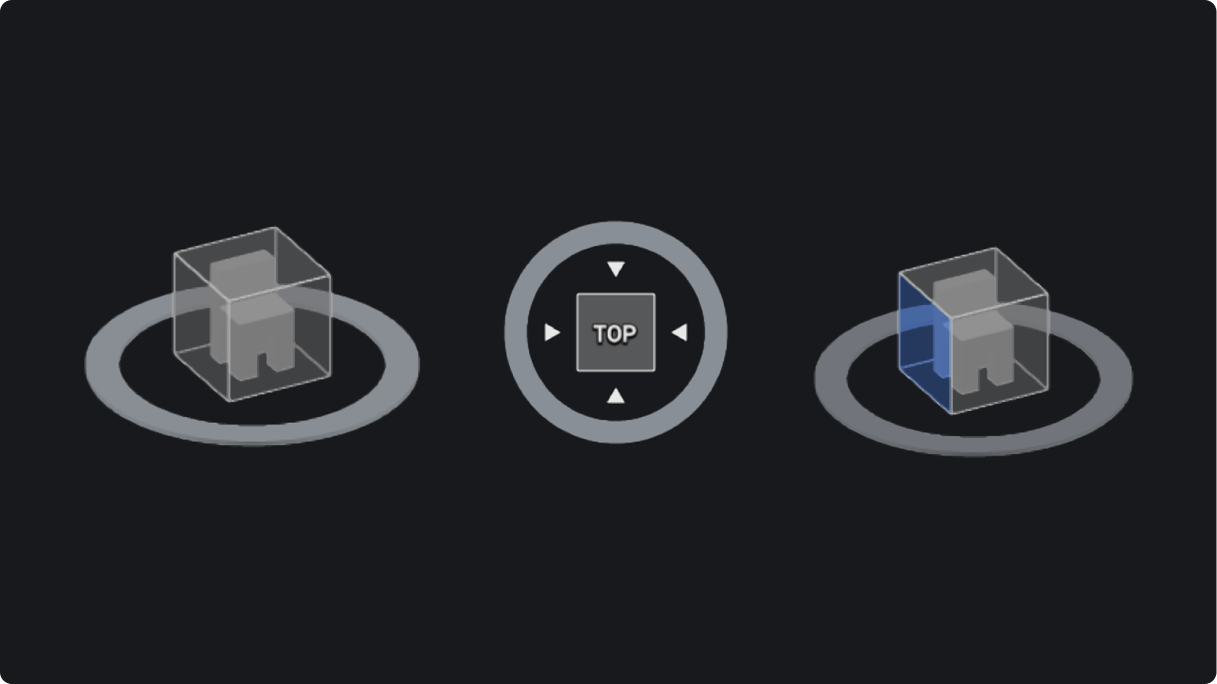
Look From widget
BricsCAD ENHANCED

Look From widget

Navigation tool to easily select the desired position on the cube and dynamically reposition a preset view.

Watch demo
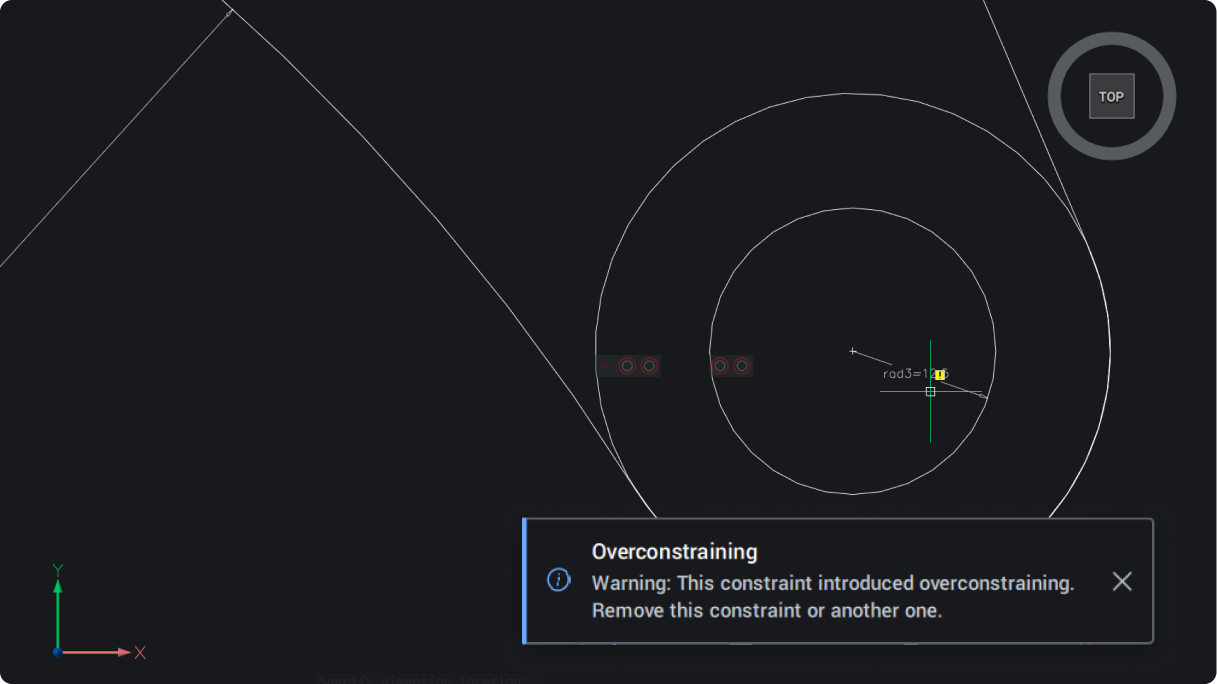
Notification message dialog box
BricsCAD ENHANCED

Notification message dialog box

Consistent notifications, offering a simple, clear pop-up for in-product warnings and updates.

Watch demo
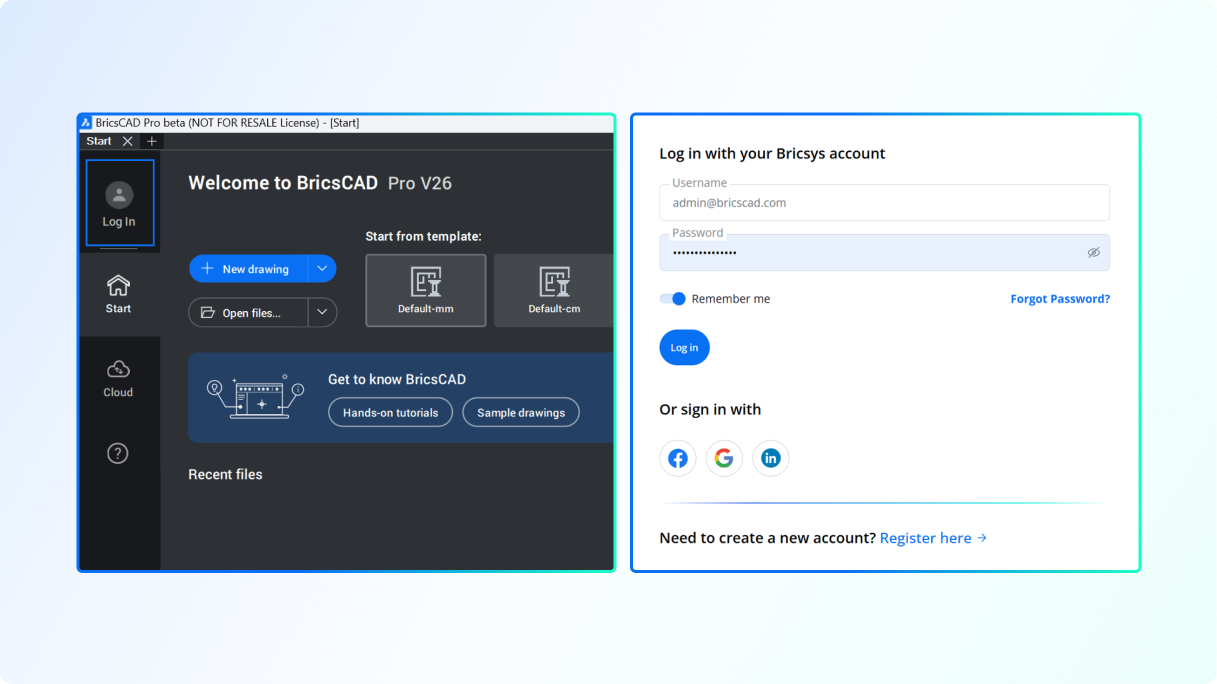
Log in process for analytics authentication
BricsCAD ENHANCED

Log in process for analytics authentication

Uniformed log in for simplified browser authentication and consistency across tools.

Watch demo
Streamlined workspace selection
BricsCAD ENHANCED

Streamlined workspace selection

A new launcher to easily find the workspace you need and get started quickly.

Watch demo
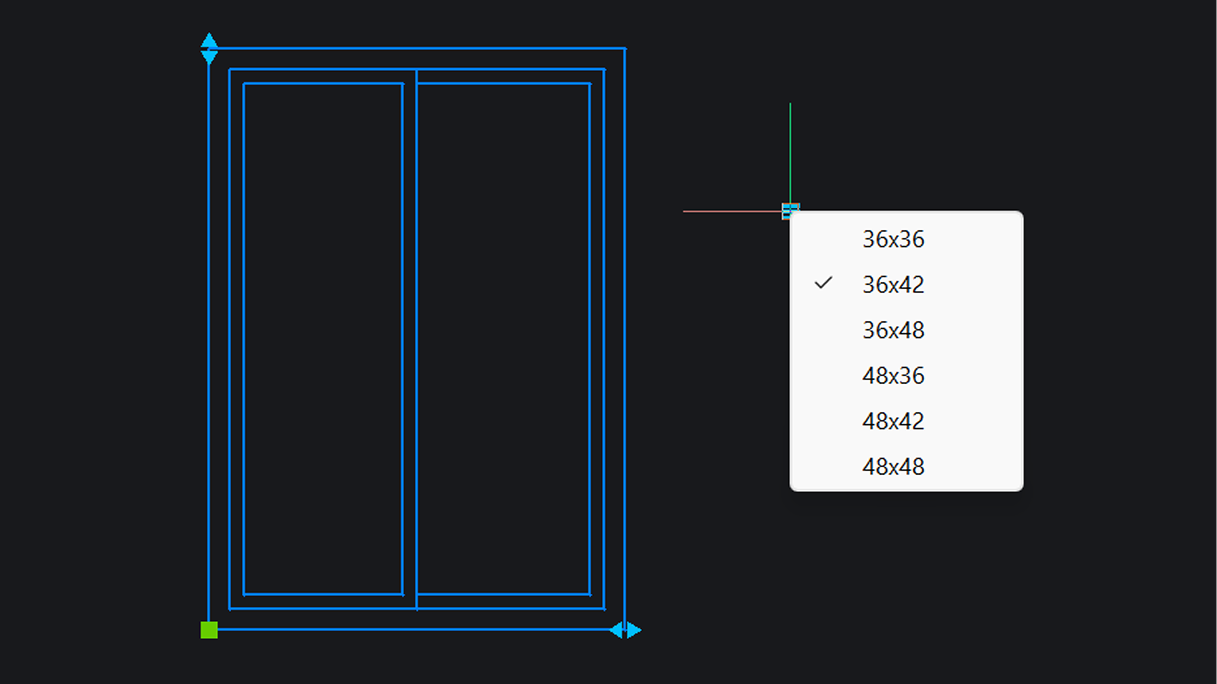
Dynamic Block creation
BricsCAD EXPERIMENTAL

Dynamic Block creation

Create Dynamic Blocks within BricsCAD (available only for users outside the United States).

Watch demo
Fillet and chamfer for all component edges
BricsCAD NEW

Fillet and chamfer for all component edges

Fillet or chamfer can be applied to all edges of a selected 3D solid in single click when solid option is selected.Unique to BricsCAD

Unique to BricsCAD Watch demo
Drawing units through command line
BricsCAD NEW

Drawing units through command line

Change the drawing units and related settings, like insertion scale and precision, through the command line (-DWGUNITS).

Watch demo
Centralized point cloud management
BricsCAD ENHANCED

Centralized point cloud management

Import, edit, and manage point clouds with thumbnails and search for quick dataset access.Unique to BricsCAD

Unique to BricsCAD Watch demo

Importing and creating files

Reverse vertices of selected geometry
BricsCAD NEW

Reverse vertices of selected geometry

Reverse the direction of lines, polylines, splines, and helixes, making it easier to read text where directionality matters.

Watch demo
Patches to fix open model faces
BricsCAD NEW

Patches to fix open model faces

Repair open boundaries of surfaces with continuity control to create solids from mesh data (SURFPATCH).

Watch demo
Dynamic input using x-axis
BricsCAD ENHANCED

Dynamic input using x-axis

Consistency within commands for simplified keyboard input, making design work easy.

Watch demo
Geometric properties of 3D solids
BricsCAD NEW

Geometric properties of 3D solids

Quickly edit geometric properties of 3D solids through the properties panel with dynamic feedback.

Watch demo
GIS import and export for GML files
BricsCAD Survey Toolset ENHANCED

GIS import and export for GML files

Import and export geospatial data with support for industry standard Geographic Markup Language (.GML) enabling consistent collaboration.

Watch demo
Civil Points creation
BricsCAD Survey Toolset ENHANCED

Civil Points creation

Generate Civil Points on objects, grids, or by converting CAD points and blocks for accurate, efficient site modeling, easily and simply.

Watch demo
Drawing Explorer block search
BricsCAD NEW

Drawing Explorer block search

Quickly find and manage blocks in large drawings, making it easy to identify which blocks are being used and reused.Unique to BricsCAD

Unique to BricsCAD Watch demo
Dynamic Block editing
BricsCAD EXPERIMENTAL

Dynamic Block editing

Edit parameters and actions of Dynamic Blocks to ensure seamless workflow compatibility in a mixed block environment (available only for users outside the United States).

Watch demo

Optimizing and editing

Faster geometry selection with Quick Select
BricsCAD ENHANCED

Faster geometry selection with Quick Select

Added functionality to QSELECT command. Select multiple entities when defining the filter.Unique to BricsCAD

Unique to BricsCAD Watch demo
Command preview visibility
BricsCAD NEW

Command preview visibility

Determines whether a preview for TRIM and EXTEND commands is shown and can be enabled or disabled by the user.

Watch demo
Optimized sheet metal recognition
BricsCAD Mechanical ENHANCED

Optimized sheet metal recognition

Advanced classification of edge features in sheet metal, with adjustable extrusion depth for better recognition.

Watch demo
Location control during model federation
BricsCAD BIM NEW

Location control during model federation

Match georeferenced locations across assets for absolute precision during model federation.

Watch demo
Reference geometry using IFC
BricsCAD BIM NEW

Reference geometry using IFC

Import IFC models as reference geometry, seperated from the model's native geometry.

Watch demo
Interference detection
BricsCAD ENHANCED

Interference detection

Intuitive UI to apply filters, query data, and manage results. Inspect and delete interferences by isolating them in model space.

Watch demo
Blockify in Create Block Definition dialog box
BricsCAD NEW

Blockify in Create Block Definition dialog box

Run Blockify within the Create Block Definition dialog box. Create new block definitions and check for exisiting blocks available for reuse.Unique to BricsCAD

Unique to BricsCAD Watch demo
Outline for Render mode
BricsCAD NEW

Outline for Render mode

Highlight the outer shape of point clouds with the new Outline filter for clearer visualization.Unique to BricsCAD

Unique to BricsCAD Watch demo
Faster and reusable 2D FEA
BricsCAD Mechanical ENHANCED

Faster and reusable 2D FEA

Edit 2D FEA objects with fewer clicks. View reaction forces, reuse setups, and zoom-highlight for faster analysis.

Watch demo
Project collaboration with shared data
BricsCAD BIM ENHANCED

Project collaboration with shared data

Work efficiently across users and teams with better access to shared project data, like spatial locations and compositions.Unique to BricsCAD

Unique to BricsCAD Watch demo
Industry-based project classification and alignment
BricsCAD BIM ENHANCED

Industry-based project classification and alignment

Classify project data to be more closely aligned with industry standard classification schemas.Unique to BricsCAD

Unique to BricsCAD Watch demo
BIM blocks for building components
BricsCAD BIM ENHANCED

BIM blocks for building components

Create detailed geometry and embed needed component information with BIM blocks, or easily convert existing blocks.Unique to BricsCAD

Unique to BricsCAD Watch demo

Detailing and annotating

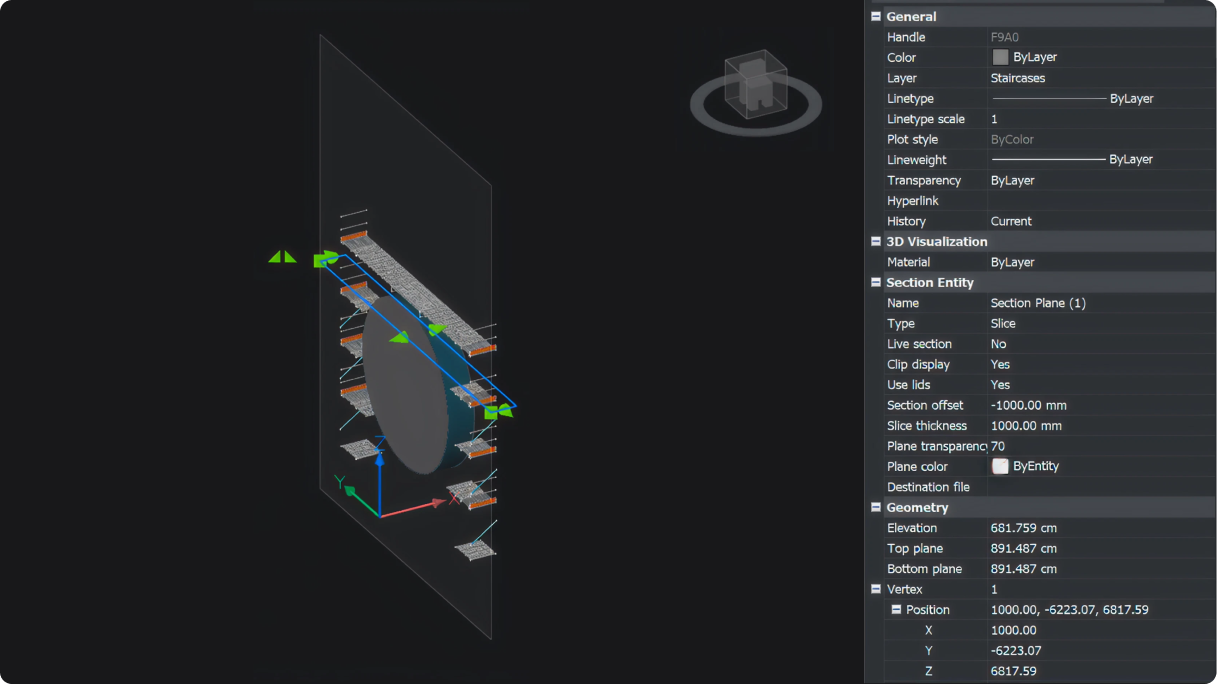
Slice section view
BricsCAD NEW

Slice section view

View a sliced section of a 3D model within a specified boundary with editable thickness and offset position.

Watch demo
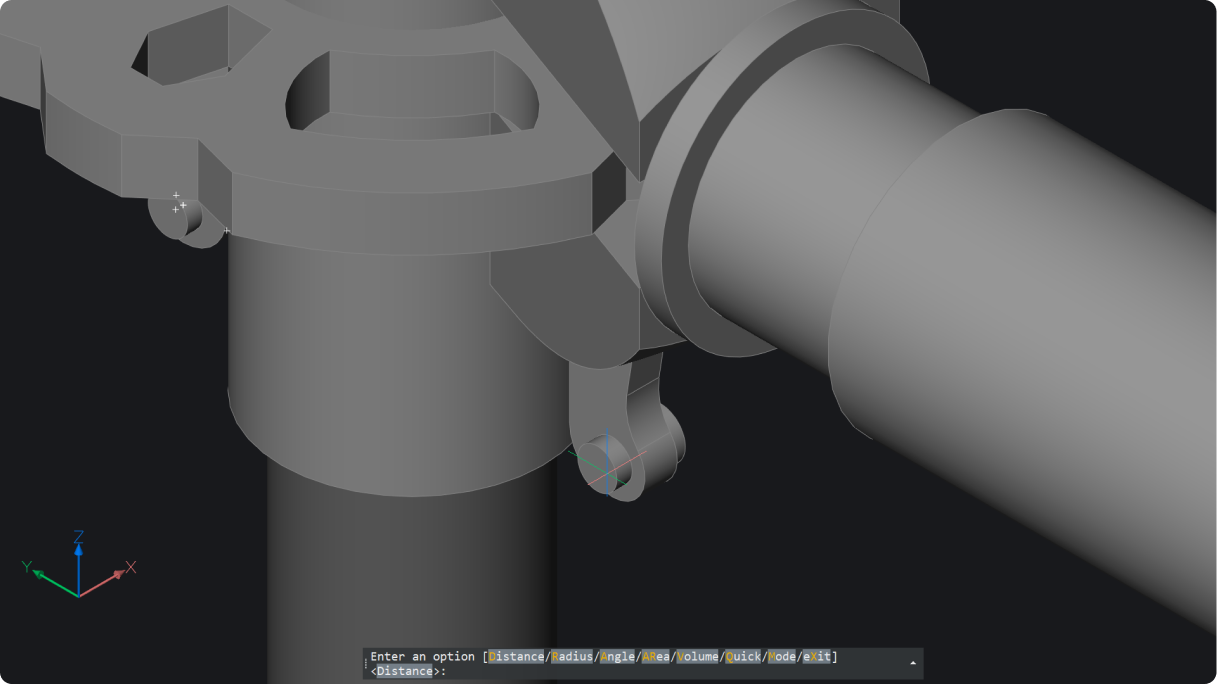
Geometry measure for 2D and 3D
BricsCAD NEW

Geometry measure for 2D and 3D

Measure 2D and 3D distances, radii, angles, areas, and volumes (MEASUREGEOM). Results appear in command prompt and dynamic tooltip.

Watch demo
2D polyline tracing on point clouds
BricsCAD NEW

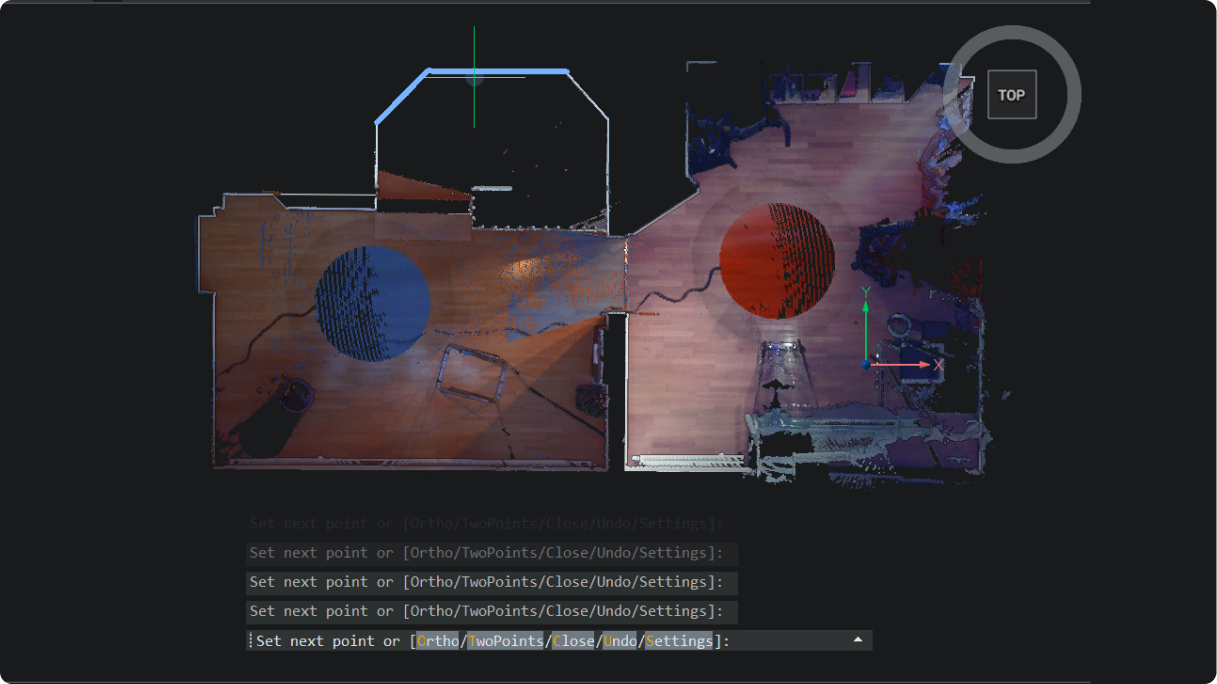
2D polyline tracing on point clouds

Easily trace polylines over point clouds with one click per segment for fast, accurate linework (POINTCLOUDTRACE).Unique to BricsCAD

Unique to BricsCAD Watch demo
Temporary ortho mode for MLeader
BricsCAD ENHANCED

Temporary ortho mode for MLeader

New functionality added to MLEADER command. Add temporary ortho alignment (press and hold Shift key) for easier leader placement.

Watch demo
Streamlined dimensioning control
BricsCAD Mechanical ENHANCED

Streamlined dimensioning control

Smarter commands and advanced UI make power dimensioning faster and more accurate.

Watch demo
Smart auto-chamfer dimensioning
BricsCAD Mechanical NEW

Smart auto-chamfer dimensioning

Save time with automated chamfer dimensions. Select the chamfer and edges to instantly create two clear linear measurements.

Watch demo
Comprehensive Weld Symbol dialog box
BricsCAD Mechanical ENHANCED

Comprehensive Weld Symbol dialog box

Quickly apply advanced weld symbols with full property control from a unified panel.

Watch demo
Effortless parts navigation
BricsCAD Mechanical NEW

Effortless parts navigation

Quickly cycle and locate through parts in drawings, combining zoom and highlight into one efficient command.

Watch demo
Auto-line detection and ortho image generation
BricsCAD BIM ENHANCED

Auto-line detection and ortho image generation

Generate orthographic images and auto-detect lines from point clouds using a section plane for precise results.

Watch demo
Auto Mapping Sets for point style assignment and management
BricsCAD Survey Toolset NEW

Auto Mapping Sets for point style assignment and management

Automatically assign point styles and layers based on point codes for faster drafting.

Watch demo
Civil Label Support for GIS data
BricsCAD Survey Toolset NEW

Civil Label Support for GIS data

Add and customize civil labels, now including automated GIS data attributes, for smarter, easier, faster annotation.

Watch demo
Civil Section creation
BricsCAD Survey Toolset NEW

Civil Section creation

Easily create Civil Sections and Section Views along any Alignment or String for detailed design insights, in bulk and at scale.

Watch demo
Product videos

In-depth breakout sessions

Already watched the keynote? Dive deeper with product experts as they demo the biggest updates across the BricsCAD platform.

Look From widget
BricsCAD

Look From widget

Navigation tool to easily select the desired position on the cube and dynamically reposition a preset view.

Notification message dialog box
BricsCAD

Notification message dialog box

Consistent notifications, offering a simple, clear pop-up for in-product warnings and updates.

Log in process for analytics authentication
BricsCAD

Log in process for analytics authentication

Uniformed log in for simplified browser authentication and consistency across tools.

Streamlined workspace selection
BricsCAD

Streamlined workspace selection

A new launcher to easily find the workspace you need and get started quickly.

Dynamic Block creation
BricsCAD

Dynamic Block creation

Create Dynamic Blocks within BricsCAD (available only for users outside the United States).

Fillet and chamfer for all component edges
BricsCAD

Fillet and chamfer for all component edges

Fillet or chamfer can be applied to all edges of a selected 3D solid in single click when solid option is selected.

Bricsys iconUnique to BricsCAD

Drawing units through command line
BricsCAD

Drawing units through command line

Change the drawing units and related settings, like insertion scale and precision, through the command line (-DWGUNITS).

Centralized point cloud management
BricsCAD

Centralized point cloud management

Import, edit, and manage point clouds with thumbnails and search for quick dataset access.

Bricsys iconUnique to BricsCAD

Reverse vertices of selected geometry
BricsCAD

Reverse vertices of selected geometry

Reverse the direction of lines, polylines, splines, and helixes, making it easier to read text where directionality matters.

Patches to fix open model faces
BricsCAD

Patches to fix open model faces

Repair open boundaries of surfaces with continuity control to create solids from mesh data (SURFPATCH).

Dynamic input using x-axis
BricsCAD

Dynamic input using x-axis

Consistency within commands for simplified keyboard input, making design work easy.

Geometric properties of 3D solids
BricsCAD

Geometric properties of 3D solids

Quickly edit geometric properties of 3D solids through the properties panel with dynamic feedback.

GIS import and export for GML files
BricsCAD Survey Toolset

GIS import and export for GML files

Import and export geospatial data with support for industry standard Geographic Markup Language (.GML) enabling consistent collaboration.

Civil Points creation
BricsCAD Survey Toolset

Civil Points creation

Generate Civil Points on objects, grids, or by converting CAD points and blocks for accurate, efficient site modeling, easily and simply.

Drawing Explorer block search
BricsCAD

Drawing Explorer block search

Quickly find and manage blocks in large drawings, making it easy to identify which blocks are being used and reused.

Bricsys iconUnique to BricsCAD

Dynamic Block editing
BricsCAD

Dynamic Block editing

Edit parameters and actions of Dynamic Blocks to ensure seamless workflow compatibility in a mixed block environment (available only for users outside the United States).

Faster geometry selection with Quick Select
BricsCAD

Faster geometry selection with Quick Select

Added functionality to QSELECT command. Select multiple entities when defining the filter.

Bricsys iconUnique to BricsCAD

Command preview visibility
BricsCAD

Command preview visibility

Determines whether a preview for TRIM and EXTEND commands is shown and can be enabled or disabled by the user.

Optimized sheet metal recognition
BricsCAD Mechanical

Optimized sheet metal recognition

Advanced classification of edge features in sheet metal, with adjustable extrusion depth for better recognition.

Location control during model federation
BricsCAD BIM

Location control during model federation

Match georeferenced locations across assets for absolute precision during model federation.

Reference geometry using IFC
BricsCAD BIM

Reference geometry using IFC

Import IFC models as reference geometry, seperated from the model's native geometry.

Interference detection
BricsCAD

Interference detection

Intuitive UI to apply filters, query data, and manage results. Inspect and delete interferences by isolating them in model space.

Blockify in Create Block Definition dialog box
BricsCAD

Blockify in Create Block Definition dialog box

Run Blockify within the Create Block Definition dialog box. Create new block definitions and check for exisiting blocks available for reuse.

Bricsys iconUnique to BricsCAD

Outline for Render mode
BricsCAD

Outline for Render mode

Highlight the outer shape of point clouds with the new Outline filter for clearer visualization.

Bricsys iconUnique to BricsCAD

Faster and reusable 2D FEA
BricsCAD Mechanical

Faster and reusable 2D FEA

Edit 2D FEA objects with fewer clicks. View reaction forces, reuse setups, and zoom-highlight for faster analysis.

Project collaboration with shared data
BricsCAD BIM

Project collaboration with shared data

Work efficiently across users and teams with better access to shared project data, like spatial locations and compositions.

Bricsys iconUnique to BricsCAD

Industry-based project classification and alignment
BricsCAD BIM

Industry-based project classification and alignment

Classify project data to be more closely aligned with industry standard classification schemas.

Bricsys iconUnique to BricsCAD

BIM blocks for building components
BricsCAD BIM

BIM blocks for building components

Create detailed geometry and embed needed component information with BIM blocks, or easily convert existing blocks.

Bricsys iconUnique to BricsCAD

Slice section view
BricsCAD

Slice section view

View a sliced section of a 3D model within a specified boundary with editable thickness and offset position.

Geometry measure for 2D and 3D
BricsCAD

Geometry measure for 2D and 3D

Measure 2D and 3D distances, radii, angles, areas, and volumes (MEASUREGEOM). Results appear in command prompt and dynamic tooltip.

2D polyline tracing on point clouds
BricsCAD

2D polyline tracing on point clouds

Easily trace polylines over point clouds with one click per segment for fast, accurate linework (POINTCLOUDTRACE).

Bricsys iconUnique to BricsCAD

Temporary ortho mode for MLeader
BricsCAD

Temporary ortho mode for MLeader

New functionality added to MLEADER command. Add temporary ortho alignment (press and hold Shift key) for easier leader placement.

Streamlined dimensioning control
BricsCAD Mechanical

Streamlined dimensioning control

Smarter commands and advanced UI make power dimensioning faster and more accurate.

Smart auto-chamfer dimensioning
BricsCAD Mechanical

Smart auto-chamfer dimensioning

Save time with automated chamfer dimensions. Select the chamfer and edges to instantly create two clear linear measurements.

Comprehensive Weld Symbol dialog box
BricsCAD Mechanical

Comprehensive Weld Symbol dialog box

Quickly apply advanced weld symbols with full property control from a unified panel.

Effortless parts navigation
BricsCAD Mechanical

Effortless parts navigation

Quickly cycle and locate through parts in drawings, combining zoom and highlight into one efficient command.

Auto-line detection and ortho image generation
BricsCAD BIM

Auto-line detection and ortho image generation

Generate orthographic images and auto-detect lines from point clouds using a section plane for precise results.

Auto Mapping Sets for point style assignment and management
BricsCAD Survey Toolset

Auto Mapping Sets for point style assignment and management

Automatically assign point styles and layers based on point codes for faster drafting.

Civil Label Support for GIS data
BricsCAD Survey Toolset

Civil Label Support for GIS data

Add and customize civil labels, now including automated GIS data attributes, for smarter, easier, faster annotation.

Civil Section creation
BricsCAD Survey Toolset

Civil Section creation

Easily create Civil Sections and Section Views along any Alignment or String for detailed design insights, in bulk and at scale.

Available now

Get the latest BricsCAD® V26 release and keep your teams aligned from concept through fabrication.